An ellipse or circle, or an arc of one: made with Curves.define_ellipse/3 or
Curves.define_circle/3.
It is one segment, so u goes from 0.0 to 1.0, like t on a Bezier curve. By default it goes
once all the way round, starting at the right-hand end of its x axis (center + {rx, 0}), the
same place an SVG <ellipse> or <circle> starts. The :from and :to options (in degrees)
give an arc of it instead, like a canvas's arc() and ellipse().
curve = Curves.define_ellipse({0, 0}, {4, 2}, rotation: 30)

# Find any point along the ellipse (u goes from 0.0 to 1.0)...
Curves.solve!(curve, 0.25)

# ...or draw it as an SVG image
Curves.Svg.save!(curve, "ellipse.svg")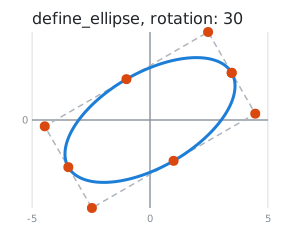
Angles and direction
Angles are in degrees, measured from the ellipse's own x axis. When :to is bigger than :from
the angle goes up, which is anticlockwise in Curves' pictures (where y goes up) and clockwise on an
SVG screen (where y goes down). When :to is smaller, it goes the other way. u moves through
the angle at a steady rate: a steady speed on a circle, but on an ellipse it goes faster round
the long sides.
Stored points
The arc is cut into pieces of at most a quarter turn, and the curve stores each piece's ends and
the point where the tangents at those ends meet. The arc always stays inside these points, even
after moving, scaling or rotating it, so :force_percent stays within 0.0..1.0 and
Curves.Svg draws them as its dots, with dashed lines like a quadratic Bezier curve's. For a
whole ellipse they are the corners of the box around it and the ends of its axes, so
around: :center (see Curves.Transform) is exactly its centre.
