Curves has a single Bezier curve, a polyline, nine kinds of spline, and ellipses. This guide helps you pick one: first a quick table, then a section on each, with what it is good at, where it falls short, and where you have probably seen it before.
New to curves? Read the tutorial first: this guide assumes you know what
knots, control points and u are.
The short answer
| You want... | Use |
|---|---|
| an easing curve for an animation | Curves.define_bezier/2 with a predefined name, or CSS's own points, like [{0, 0}, {0.42, 0}, {0.58, 1}, {1, 1}] for ease-in-out |
| one custom bend, from one point to another | Curves.define_bezier/2 |
| straight lines between your points | Curves.define_polyline/2 |
| to copy an SVG path, or a font outline | Curves.define_bezier_spline/2 |
| the shapes in an SVG file, as curves | Curves.from_svg/2 |
| a circle, an ellipse, or an arc of one | Curves.define_circle/3 or Curves.define_ellipse/3 |
| a smooth path through your points, quickly | Curves.define_centripetal_catmull_rom/2 |
| the classic Catmull-Rom spline, exactly | Curves.define_catmull_rom/2 |
| a smooth path through your points, with a "tightness" slider | Curves.define_cardinal/2 |
| keyframe animation with tension, continuity and bias dials | Curves.define_kochanek_bartels/2 |
| to set the direction and speed at each point yourself | Curves.define_hermite/2 |
| a smooth line through chart data that never overshoots it | Curves.define_monotone/2 |
| the smoothest possible curve that still hits every point | Curves.define_natural_cubic/2 |
| the smoothest possible curve, and close to the points is good enough | Curves.define_b_spline/2 |
How they compare
| Curve | Goes through your points? | How smooth? | Moving one point changes... | Can swing past your points? |
|---|---|---|---|---|
| Bezier | first and last only | one smooth piece | the whole curve | no |
| Polyline | yes | sharp corners | the two lines touching it | no |
| Bezier spline | the knots | as smooth as your control points make it | the two segments touching it | no |
| Ellipse | its start and end | perfectly smooth | the whole curve | no |
| Hermite | yes | smooth direction | the two segments touching it | yes |
| Catmull-Rom | yes | smooth direction | up to 4 nearby segments | yes, and can loop |
| Cardinal | yes | smooth direction | up to 4 nearby segments | yes, less with more tension |
| Centripetal Catmull-Rom | yes | smooth direction | up to 4 nearby segments | a little, but never loops |
| Kochanek-Bartels | yes | smooth direction, or corners if you ask | up to 4 nearby segments | yes |
| Monotone | yes | smooth direction | the nearby segments | never |
| Natural cubic | yes | smooth direction and bend | every segment | yes |
| B-spline | no, only near them | smooth direction and bend | up to 4 nearby segments | no |
"Smooth direction" means no corners: the curve never changes direction suddenly. "Smooth bend" goes one step further: how sharply the curve turns changes gradually too, so there are no sudden changes in how it bends. You can see the difference in reflections on a car body, or feel it in a roller coaster.
If you know d3, most of its curves are here too:
| d3 | Curves |
|---|---|
curveLinear | define_polyline/2 |
curveBasis | define_b_spline/2 |
curveCardinal.tension(t) | define_cardinal(points, tension: t) |
curveCatmullRom (alpha 0.5) | define_centripetal_catmull_rom/2 |
curveCatmullRom.alpha(0) | define_catmull_rom/2 |
curveMonotoneX | define_monotone/2 (a close relative: d3 uses Steffen's method) |
curveNatural | define_natural_cubic/2 |
Bezier curve
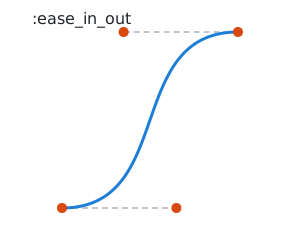
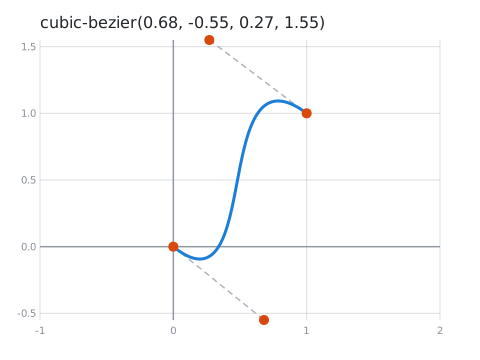
One curve with 2 to 4 points: it starts at the first, ends at the last, and is pulled towards the ones in between. Curves comes with the classic easing curves ready-made, by name.
Curves.define_bezier(:ease_in_out)
Curves.define_bezier([{0, 0}, {0.68, -0.55}, {0.27, 1.55}, {1, 1}])
:ease_in_out | A custom curve |
|---|---|
 |  |
- Good at: easing. Animate anything from A to B with a natural feel.
- Falls short: it's only one bend. For a longer path, use a spline.
- You've seen it in: CSS's
transition-timing-function(ease,ease-in-outandcubic-bezier(...)are all cubic Bezier curves), the pen tool in vector drawing apps like Illustrator, Figma and Inkscape, and font outlines (TrueType fonts use quadratic Beziers, OpenType CFF fonts cubic ones).
Polyline
Straight lines from point to point.
Curves.define_polyline([{0, 0}, {2, 3}, {4, 1}, {6, 4}, {8, 2}])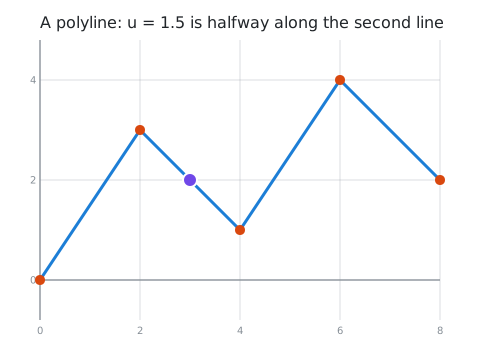
- Good at: being exact and honest. Every point is where you put it, and nothing is made up between them. It's also the cheapest.
- Falls short: sharp corners. Something moving along it turns instantly at each point.
- You've seen it in: SVG's
<polyline>, GPS tracks (a run or a drive recorded as points joined by lines), plain line charts, and drawing apps that record your mouse or finger as a list of points.
Bezier spline
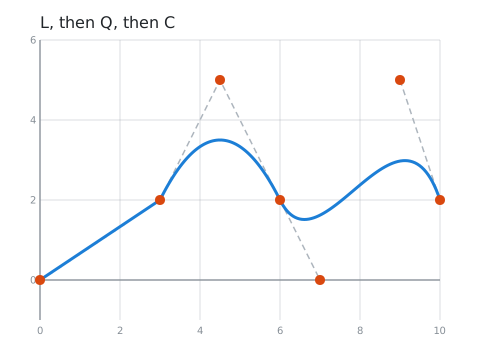
A chain of Bezier curves, written like an SVG path: each knot, then the control points of the curve to the
next knot. Each piece can be a straight line (SVG L), a quadratic curve (Q) or a cubic curve (C).
Curves.define_bezier_spline([
  [{0, 0}],                 # a straight line to {3, 2}
  [{3, 2}, {4.5, 5}],       # a quadratic curve to {6, 2}
  [{6, 2}, {7, 0}, {9, 5}], # a cubic curve to {10, 2}
  [{10, 2}]                 # the end
])
- Good at: total control, and talking to other tools. Anything drawn with SVG paths, a canvas or a vector drawing app can be copied in exactly.
- Falls short: you have to place every control point yourself. To keep the curve smooth through a knot, the control points either side of it must line up.
- You've seen it in: SVG's
<path>, the HTML canvas'sbezierCurveToandquadraticCurveTo, and every letter of the font you're reading.
Ellipses, circles and arcs
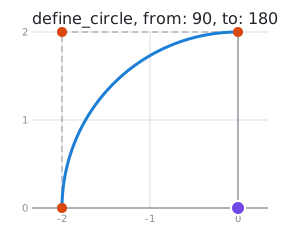
An exact ellipse or circle, or an arc of one: not built from Bezier curves, so it is perfectly round, and a
whole one ends exactly where it started. Give the centre and radii; :rotation tilts it, and :from and
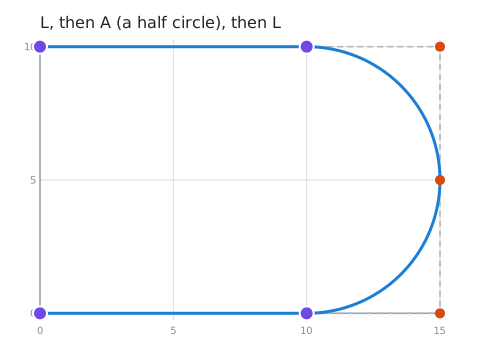
:to (in degrees) cut out an arc. A bezier spline can also contain arcs, like SVG's A command.
Curves.define_circle({0, 0}, 2, from: 90, to: 180)
Curves.define_bezier_spline([[{0, 0}], [{10, 0}, {:arc, 5, 5, 0, false, true}], [{10, 10}], [{0, 10}]])| An arc of a circle | A path with an arc |
|---|---|
 |  |
- Good at: anything round: wheels, dials, gauges, orbits, rounded corners, and anything that turns at
a steady rate. On a circle,
umoves at a steady speed. - Falls short: on a long, thin ellipse the speed isn't steady: it goes faster round the long sides.
- You've seen it in: SVG's
<circle>,<ellipse>and the path commandA, the canvas'sarc()andellipse(), theG2andG3commands that move CNC machines and 3D printers in arcs, and every pie chart and progress ring.
Hermite
A smooth curve through every knot, where you give each knot a tangent: the direction to travel and how fast.
Curves.define_hermite([[{0, 0}, {4, 0}], [{4, 2}, {2, 0}], [{8, 0}, {4, 0}]])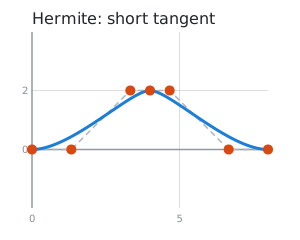
- Good at: motion where you know the speed and direction at each point, not just the position. Every other spline in this guide (except the B-spline) is a Hermite spline that works out the tangents for you.
- Falls short: you have to come up with every tangent.
- You've seen it in: animation keyframes with in and out tangents, such as Unity's
AnimationCurveand theCUBICSPLINEanimations in glTF 3D models, and robot or vehicle paths planned through waypoints with a known velocity at each.
Catmull-Rom
Give it the knots, and it works out the tangents: at each knot, the curve heads in the direction from the knot before it to the knot after it.
Curves.define_catmull_rom([{0, 0}, {2, 3}, {4, 1}, {6, 4}, {8, 2}])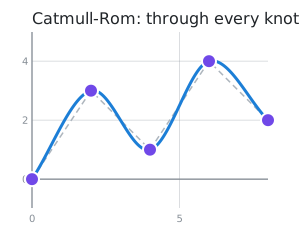
- Good at: the easiest smooth path through a list of points. Moving a knot only changes the curve near it.
- Falls short: when some knots are much closer together than others, it can overshoot, make sharp points, or loop (see centripetal below).
- You've seen it in: camera paths and patrol routes in games, the
Splinecurve in the Phaser game framework, and three.js'sCatmullRomCurve3(as its"catmullrom"type).
Cardinal
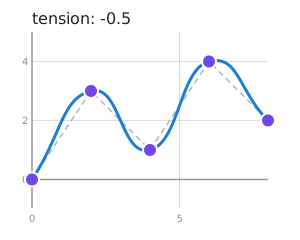
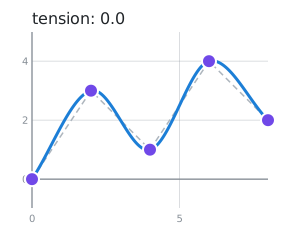
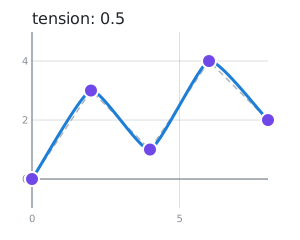
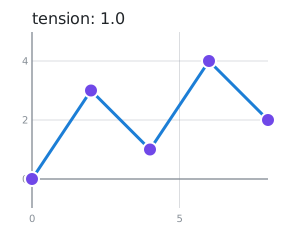
Catmull-Rom with a :tension slider. 0.0 is exactly Catmull-Rom; higher values pull the curve tighter
at each knot, until at 1.0 it's straight lines.
Curves.define_cardinal([{0, 0}, {2, 3}, {4, 1}, {6, 4}, {8, 2}], tension: 0.5)tension: -0.5 | tension: 0.0 | tension: 0.5 | tension: 1.0 |
|---|---|---|---|
 |  |  |  |
- Good at: letting a user (or a designer) choose how loose or tight a smooth line looks.
- Falls short: one tension for the whole curve, and it can still loop like Catmull-Rom.
- You've seen it in: d3's
curveCardinal, thetensionsetting on lines in the Konva canvas library, andDrawCurvein Windows' GDI+ graphics, which draws cardinal splines.
Centripetal Catmull-Rom
Catmull-Rom that takes the distances between knots into account. It's proven never to make loops or sharp points (cusps) within a segment, and it hugs the knots more closely. If you want "a smooth line through these points" and don't need anything else, this is the one to pick.
Curves.define_centripetal_catmull_rom([{0, 0}, {10, 10}, {10.5, 10}, {20, 0}])| Plain Catmull-Rom | Centripetal |
|---|---|
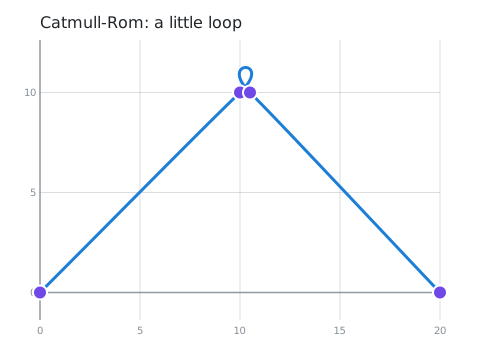 | 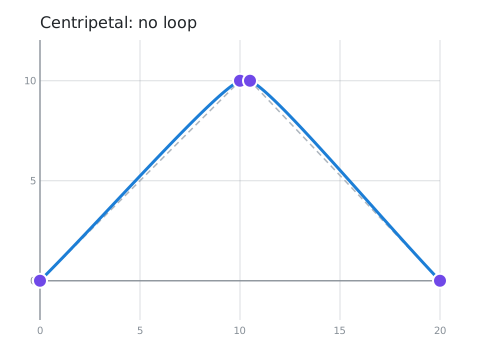 |
The :alpha option sets how much the distances count: 0.5 (the default) is centripetal, 0.0 is plain
Catmull-Rom and 1.0 is chordal.
- Good at: paths through points that a person clicked, recorded or digitised, where some points are bunched up and others are far apart.
- Falls short: because each segment still takes one unit of
u, the speed can jump at a knot (the direction never does). To move at a steady speed, sample it with many points and walk along those. - You've seen it in: d3's
curveCatmullRom(whose default alpha is 0.5) and three.js'sCatmullRomCurve3(whose default type is"centripetal"). It's the subject of the paper Parameterization and applications of Catmull-Rom curves (Yuksel, Schaefer and Keyser, 2011), which proved it never loops.
Kochanek-Bartels (TCB)
Catmull-Rom with three dials. :tension works like the cardinal spline's. :continuity makes corners
(below 0) or bulges (above 0) at the knots. :bias makes the curve turn early (below 0) or late, swinging
past each knot (above 0). With all three at 0.0 it's exactly Catmull-Rom.
Curves.define_kochanek_bartels([{0, 0}, {2, 3}, {4, 1}, {6, 4}, {8, 2}], bias: 0.7)continuity: -0.7 | continuity: 0.7 | bias: -0.7 | bias: 0.7 |
|---|---|---|---|
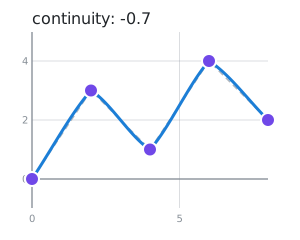 | 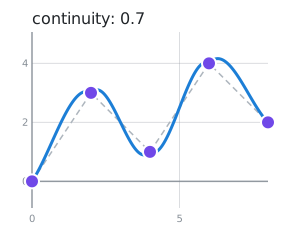 | 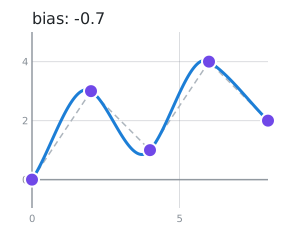 | 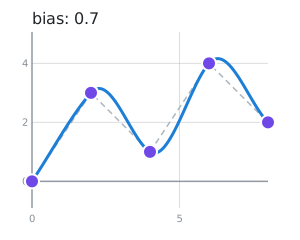 |
- Good at: keyframe animation with character. Bias gives a bouncing ball its overshoot, continuity gives a sharp change of direction, and tension makes a move snap into place.
- Falls short: three more numbers to tune. Here they apply to every knot, while animation tools usually let you set them per keyframe.
- You've seen it in: the TCB controllers of 3D Studio Max, and LightWave 3D's motion graphs. It comes from the 1984 paper Interpolating splines with local tension, continuity, and bias control by Kochanek and Bartels.
Monotone
A smooth line through data points that never overshoots them. Between two points it only goes up, only
goes down, or stays flat, so a flat stretch of data stays flat, and the line never shows a peak or dip
that isn't in the data. Each point's x must be bigger than the one before.
Curves.define_monotone([{0, 2}, {1, 2}, {2, 2}, {3, 8}, {4, 8.5}, {5, 3}, {6, 3}])| Polyline | Catmull-Rom | Natural cubic | Monotone |
|---|---|---|---|
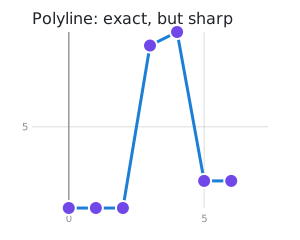 | 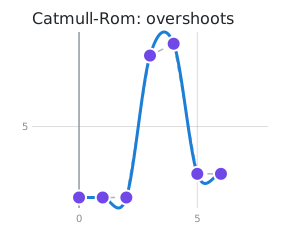 | 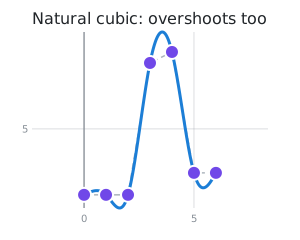 | 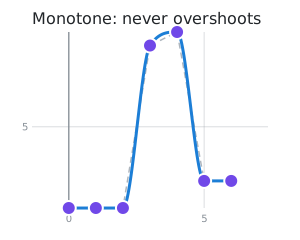 |
- Good at: charts. Prices, temperatures, counts: anything where a curve that dips below zero, or above the highest value, would be lying.
- Falls short: it only works on data, where
xalways goes one way. It can't draw a circle or a path that turns back. - You've seen it in: smoothed line charts, such as Chart.js's
cubicInterpolationMode: 'monotone'and d3'scurveMonotoneX. Its relative, PCHIP, is a standard tool in MATLAB (pchip) and SciPy (PchipInterpolator). This one uses the Fritsch–Carlson method (1980).
Natural cubic
The smoothest curve through every knot: not only its direction but also how sharply it bends changes smoothly everywhere, and it straightens out at both ends.
Curves.define_natural_cubic([{0, 0}, {2, 3}, {4, 1}, {6, 4}, {8, 2}])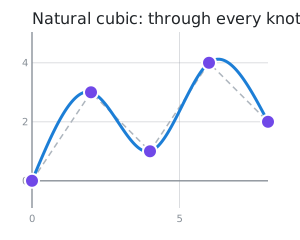
- Good at: fair, flowing shapes, and interpolating smooth measurements. It's what you get from bending a thin, springy strip through pins at the knots.
- Falls short: every knot affects the whole curve, so moving one point changes everything a little. It can overshoot, like Catmull-Rom.
- You've seen it in: the draftsman's spline, a flexible strip of wood bent around weights, used to
draw ship hulls and aircraft before computers (and where the word "spline" comes from), d3's
curveNatural, and SciPy'sCubicSpline(bc_type="natural").
B-spline
The smoothest of all, but it doesn't go through your points: they pull it towards them, like magnets.
Curves.define_b_spline([{0, 0}, {2, 3}, {4, 1}, {6, 4}, {8, 2}])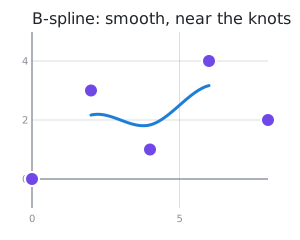
- Good at: smooth shapes you sculpt by moving points around, and smoothing out noisy points. It never goes outside the points that shape it.
- Falls short: it doesn't hit your points, and it only covers the middle:
npoints given - 3segments. - You've seen it in: CAD and 3D modelling, where NURBS (a more general form of B-spline) describe
car bodies, aircraft parts and 3D-printed models, in tools like Rhino and Blender, and d3's
curveBasis.