Prefer to play? This chapter is also an interactive Livebook where you move knots, switch spline types, bend tangents and turn the dials with sliders.
A spline joins several curves end to end into one smooth path. Each piece is called a segment, and the points where segments meet are called knots. This chapter also covers the simplest path of all, the polyline, which joins the knots with straight lines.
u: which segment, and how far along it
On a single Bezier curve, t goes from 0.0 to 1.0. On a spline, you use u, and each segment adds
one to it: u = 0.0 to 1.0 is the first segment, 1.0 to 2.0 the second, and so on. Whole numbers
land exactly on the knots. Curves.max_u/1 tells you where the spline ends:
curve = Curves.define_catmull_rom([{0, 0}, {2, 3}, {4, 1}, {6, 4}, {8, 2}])
Curves.max_u(curve)
#=> 4.0
Curves.solve!(curve, 2.0)
#=> {4.0, 1.0}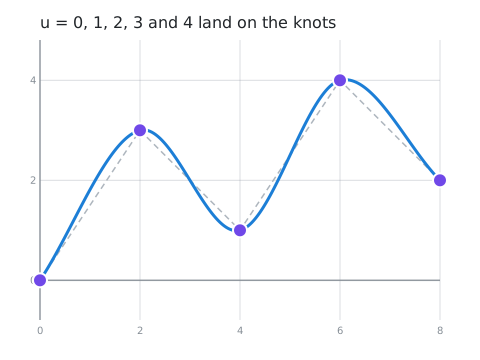
Curves.take!/2 works the same way: it spreads its points over the whole spline.
The simplest path: a polyline
A polyline just joins the knots with straight lines, like SVG's <polyline>. It isn't a spline (nothing
bends), but you move along it with u in exactly the same way, and at a steady speed along each line:
u = 1.5 is halfway between the second and third knots.
curve = Curves.define_polyline([{0, 0}, {2, 3}, {4, 1}, {6, 4}, {8, 2}])
Curves.solve!(curve, 1.5)
#=> {3.0, 2.0}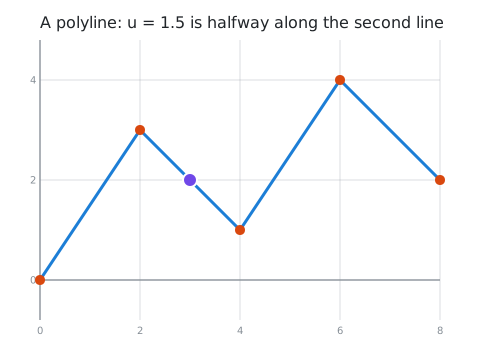
Kinds of spline
Curves has nine kinds of spline. They all join curves together, but they differ in what you give them and how they bend. Here are the first four; the other five are variations on Catmull-Rom, below.
Catmull-Rom: through every knot, no extra work
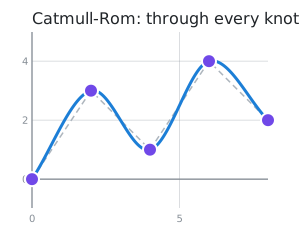
Give it the knots, and it works out the bends for you. The curve passes through every knot. This is the easiest spline to use.
Curves.define_catmull_rom([{0, 0}, {2, 3}, {4, 1}, {6, 4}, {8, 2}])B-spline: the smoothest, but only near the knots
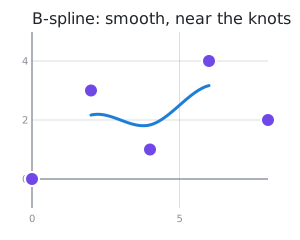
A B-spline is even smoother, but it does not pass through your knots: it is pulled towards them, and
it only covers the middle part (n knots give n - 3 segments). It needs at least 4 knots.
Curves.define_b_spline([{0, 0}, {2, 3}, {4, 1}, {6, 4}, {8, 2}])| Same knots (purple), two splines | |
|---|---|
 |  |
Bezier spline: you control every bend
A chain of Bezier curves, written like an SVG path. Each point is a knot, followed by the control points of the curve to the next knot:
| Point | The curve to the next knot | Like SVG's |
|---|---|---|
[knot] | a straight line | L |
[knot, c] | a quadratic curve, pulled towards c | Q |
[knot, c0, c1] | a cubic curve: leaves knot towards c0, arrives from c1 | C |
[knot, {:arc, rx, ry, rotation, large_arc, sweep}] | an elliptical arc | A |
The last point only ends the curve, so it is just [knot].
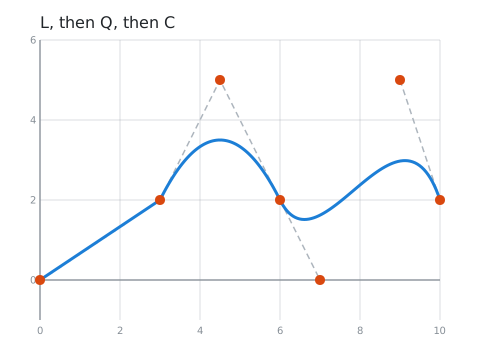
Curves.define_bezier_spline([
  [{0, 0}],                       # a straight line to {3, 2}
  [{3, 2}, {4.5, 5}],             # a quadratic curve to {6, 2}
  [{6, 2}, {7, 0}, {9, 5}],       # a cubic curve to {10, 2}
  [{10, 2}]                       # the end
])
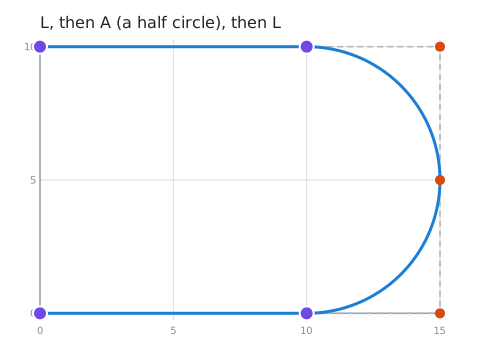
An arc is a piece of an ellipse with radii rx and ry, from its knot to the next one, just like
SVG's A. Here's a straight line, a half circle and another straight line (SVG
M 0 0 L 10 0 A 5 5 0 0 1 10 10 L 0 10):
Curves.define_bezier_spline([
  [{0, 0}],
  [{10, 0}, {:arc, 5, 5, 0, false, true}],
  [{10, 10}],
  [{0, 10}]
])
There are usually four arcs of the same ellipse between two points, and the last two values pick one:
large_arc takes the long way round, and sweep picks the direction (true goes anticlockwise in these
pictures, where y goes up).
sweep: false | sweep: true | |
|---|---|---|
large_arc: false | 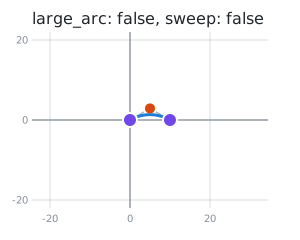 | 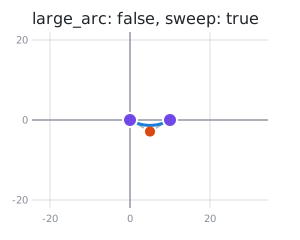 |
large_arc: true | 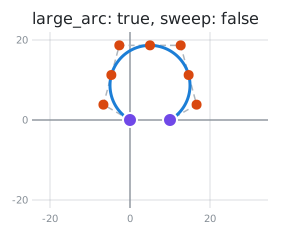 | 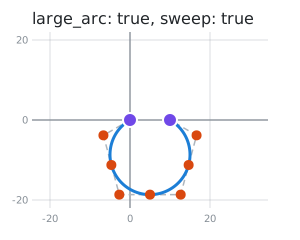 |
The orange dots and dashed lines show the shape the arc stays inside, like a Bezier curve's control points.
Hermite: say which way to go
A Hermite spline passes through every knot, and at each knot you give a tangent: the direction the curve travels, and how fast. A longer tangent makes the curve keep its direction for longer before it turns. Here only the middle tangent changes:
Curves.define_hermite([
  [{0, 0}, {4, 0}],    # [knot, tangent]
  [{4, 2}, {2, 0}],    # try {12, 0} here
  [{8, 0}, {4, 0}]
])
{2, 0} | {12, 0} |
|---|---|
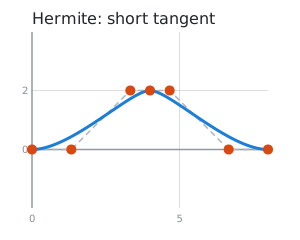 | 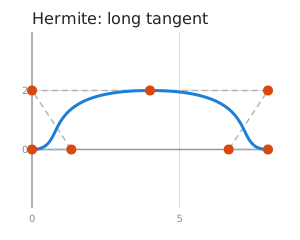 |
Catmull-Rom is a Hermite spline that works out the tangents for you. So are the next five: each one is a different recipe for the tangents. Like Catmull-Rom, you only give them the knots, and they pass through every one.
Cardinal: Catmull-Rom with a tension slider
:tension pulls the curve tighter at each knot. 0.0 (the default) is exactly Catmull-Rom, and 1.0
gives straight lines.
Curves.define_cardinal([{0, 0}, {2, 3}, {4, 1}, {6, 4}, {8, 2}], tension: 0.5)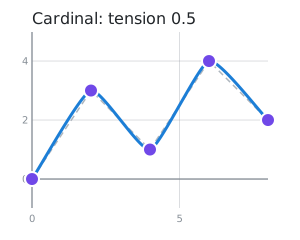
Centripetal Catmull-Rom: no loops
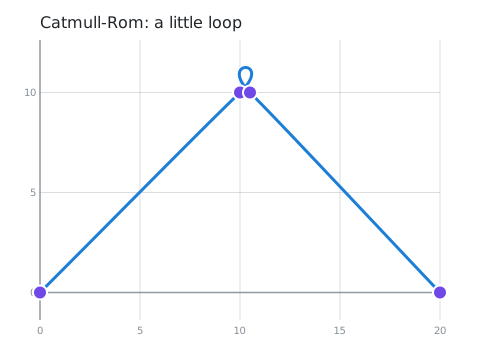
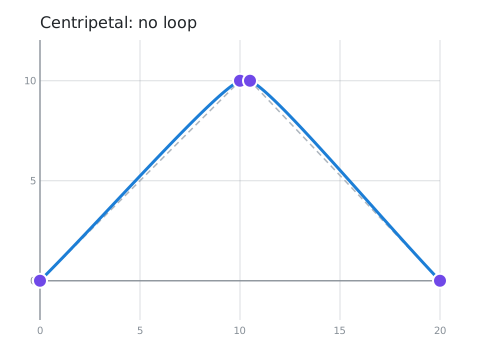
When some knots are much closer together than others, plain Catmull-Rom can overshoot and even make a little loop. The centripetal version takes the distances between the knots into account, and never loops. If you just want a smooth path through some points, this is a great default.
Curves.define_centripetal_catmull_rom([{0, 0}, {10, 10}, {10.5, 10}, {20, 0}])| Plain Catmull-Rom | Centripetal |
|---|---|
 |  |
Kochanek-Bartels: three dials
Also called a TCB spline, after its three dials: :tension (like the cardinal spline's), :continuity
(sharp corners or bulges at the knots) and :bias (turn early, or late and overshoot). Animation tools use
it for keyframes. With all three at 0.0, it's Catmull-Rom.
Curves.define_kochanek_bartels([{0, 0}, {2, 3}, {4, 1}, {6, 4}, {8, 2}], bias: 0.5)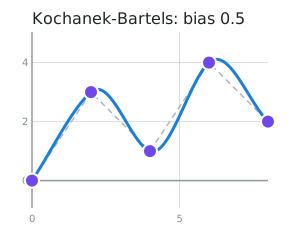
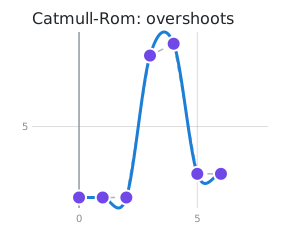
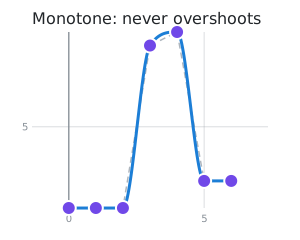
Monotone: for charts
The other splines can swing above or below your points. That's bad for a chart: it shows peaks and dips
that aren't in the data. A monotone spline never overshoots: between two knots it only goes up, only goes
down, or stays flat. Each knot is a data point, so each x must be bigger than the one before.
Curves.define_monotone([{0, 2}, {1, 2}, {2, 2}, {3, 8}, {4, 8.5}, {5, 3}, {6, 3}])| Catmull-Rom | Monotone |
|---|---|
 |  |
Natural cubic: the smoothest through every knot
A B-spline is smooth because even how sharply it bends changes gradually, but it misses your knots. A natural cubic spline is that smooth and goes through every knot. The catch: each knot affects the whole curve, so moving one changes everything a little.
Curves.define_natural_cubic([{0, 0}, {2, 3}, {4, 1}, {6, 4}, {8, 2}])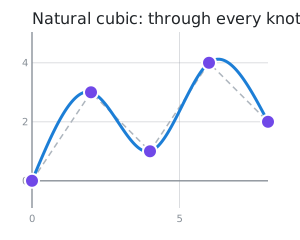
Ellipses, circles and arcs
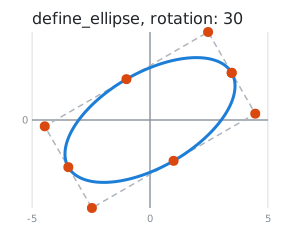
Curves.define_ellipse/3 and Curves.define_circle/3 draw a whole ellipse or circle, given its centre and
radii. It is one segment, so u goes from 0.0 to 1.0, once round. :rotation tilts it, and :from
and :to (in degrees) give an arc of it instead, like a canvas's arc():
Curves.define_ellipse({0, 0}, {4, 2}, rotation: 30)
Curves.define_circle({0, 0}, 2, from: 90, to: 180)| An ellipse | An arc of a circle |
|---|---|
 | 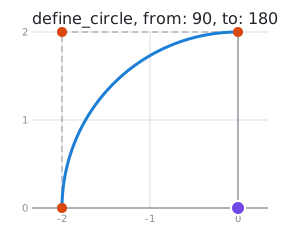 |
Arcs are exact: they aren't made of Bezier curves, and a whole ellipse ends exactly where it started.
Which one should I use?
| You want... | Use |
|---|---|
| straight lines between your points | define_polyline/2 |
| a smooth path through some points, quickly | define_centripetal_catmull_rom/2 |
| the classic Catmull-Rom spline | define_catmull_rom/2 |
| to choose how tightly it bends | define_cardinal/2 or define_kochanek_bartels/2 |
| a smooth line through chart data, without made-up peaks | define_monotone/2 |
| the smoothest path that still hits every point | define_natural_cubic/2 |
| the smoothest possible path, and don't need to hit the points exactly | define_b_spline/2 |
| exact control over every bend, or to copy an SVG path | define_bezier_spline/2 |
| to set the direction and speed at each point | define_hermite/2 |
| a circle, an ellipse, or an arc of one | define_circle/3, define_ellipse/3, or an arc in define_bezier_spline/2 |
Choosing a curve compares them all side by side, with real-world examples of each.
Next: Transforms and drawing.